
51K
Bitmap Rotator
World's simplest bitmap tool
This is a free and fast online utility that rotates BMP (bitmap) images. You can use the configuration options (below) to set the rotation angle in degrees or radians, or turn the image interactively in the input preview. Extra options allow you to choose the background color for the empty canvas areas created around the rotated bitmap. Created by graphics designers from team Browserling.
Check out our main project!
Browserling
We created Browserling – get a cloud browser in 5 seconds. Check it out!
A link to this tool, including input, options and all chained tools.
Click here to select an image from your device, press Ctrl+V to use an image from your clipboard, drag and drop a file from desktop, or load an image from any example below.
Release your mouse to import this file.
Your file is being imported...
Can't convert.
What is a Bitmap Rotator?
learn more about this tool
This free online browser-based program rotates BMP (bitmap) images clockwise or counterclockwise. You can use it to correct a sideways bitmap, straighten a slightly tilted scan, or deliberately place bitmap artwork on a diagonal. You can turn the image directly in the input preview by clicking and dragging around it, which is useful when the result only needs to look right by eye. When the orientation must be exact, choose degrees or radians and type the angle in the corresponding field. Positive values turn the bitmap counterclockwise, while a minus sign changes the movement to clockwise. For example, 90 degrees turns the picture on its left side, -90 degrees turns it on its right side, and 180 degrees makes it upside-down. If you prefer radians, 1.5708 is a quarter-turn, and 3.1416 is a half-turn. The output canvas automatically expands to contain the four rotated corners, so the bitmap is not clipped along its new edges. These extra corner areas are white by default, but you can paint them any color using the background option. Bmp-abulous!
Bitmap Rotator examples
Click to usePoint an Ice Cream Straight Up
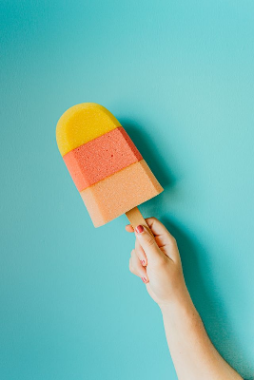
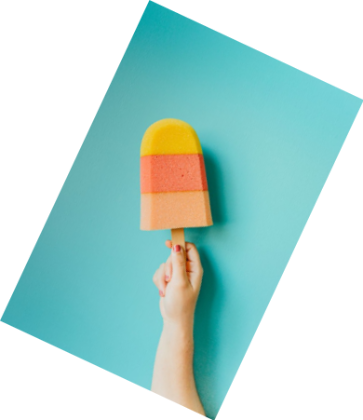
In this example, we correct the orientation of a BMP photo of a colorful ice cream held in a hand. We enter -25 degrees, and the negative angle rotates the image clockwise until the ice cream points straight up. The turn creates four empty corners around the tilted photo, which we fill with the default white background. (Source: Pexels.)
Required options
Enter a positive or negative
angle measured in degrees.
Fill the empty corners created
by rotation. Use a color name,
hex code, RGB value, or palette.
Turn a Cat Photo by a Right Angle
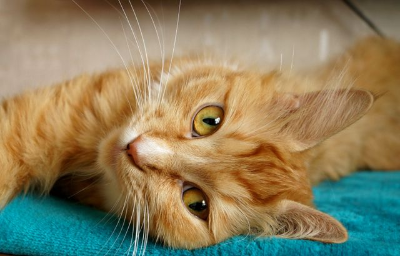
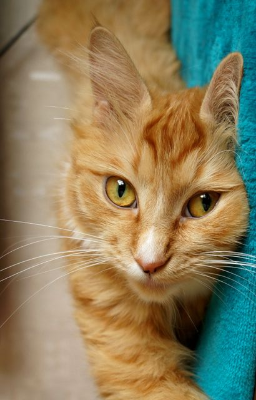
In this example, we rotate a BMP photo of an orange tabby cat by a right angle. We enter 90 degrees, which turns the image counterclockwise by one quarter-turn. The cat, previously lying horizontally across a turquoise blanket, is now oriented vertically down the frame. (Source: Pexels.)
Required options
Enter a positive or negative
angle measured in degrees.
Fill the empty corners created
by rotation. Use a color name,
hex code, RGB value, or palette.
Turn an Espresso Cup Handle to the Left
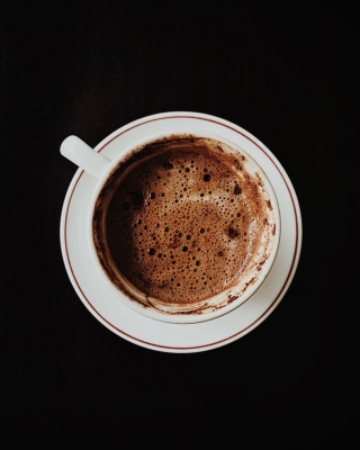
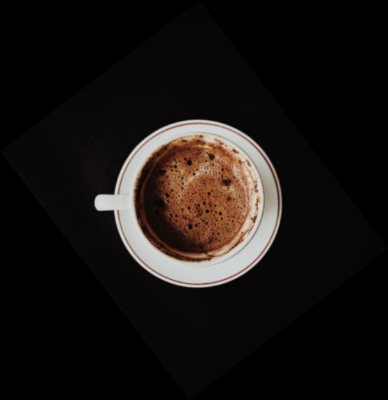
In this example, we rotate a BMP photo of an espresso cup directly in the input preview. We drag the image counterclockwise by eye until the cup handle points to the left. The tool measures this visual adjustment in radians and displays the resulting value of 0.65 radians in the options, which is approximately 37.2 degrees. As the original bitmap has a solid black background, we also fill the newly created corners with black. The matching colors blend together, making the boundary of the rotated image impossible to notice. (Source: Pexels.)
Required options
Enter a positive or negative
angle measured in radians.
Fill the empty corners created
by rotation. Use a color name,
hex code, RGB value, or palette.
All bitmap tools
Quickly convert an opaque bitmap to a transparent bitmap.
Quickly substitute one color for another in a bitmap.
Quickly find all colors in a bitmap and extract them.
Quickly change the number of bits used by every BMP pixel.
Quickly turn a color bitmap into a grayscale bitmap.
Quickly animate a bitmap sprite sheet.
Quickly convert an animation into a bitmap sprite sheet.
Quickly blur an area of a bitmap.
Quickly sharpen an area of a bitmap.
Quickly pixelate an area of a bitmap.
Quickly create a bitmap file from random, colorful pixels.
Quickly change the width/height of a bitmap.
Quickly select a region from a bitmap.
Quickly rotate a bitmap by any angle.
Quickly add a border around or inside a bitmap.
Quickly delete a border that surrounds a bitmap.
Quickly create a byte array from a BMP image.
Quickly create a BMP image from a byte array.
Quickly convert RGB bitmap colors to BGR channel order.
Quickly convert BGR bitmap colors to RGB channel order.
Quickly create a BMP image by mapping text symbols to colored pixels.
Quickly convert a BMP file to the base-64 encoding.
Quickly convert base-64 encoding to a BMP file.
Coming soon
These bitmap tools are on the way
Edit and Draw Bitmaps
Create and edit bitmaps in your browser.
Compress a Bitmap
Make a bitmap smaller in size.
Uncompress a Bitmap
Convert a compressed bitmap to a raw RGB pixel bitmap.
Swirl a Bitmap
Create a swirl of any radius in a bitmap.
Make Bitmap Black and White
Reduce all bitmap colors to just black and white.
Merge Bitmaps
Join two or more bitmaps together.
Overlay Bitmaps
Place two or more bitmaps on top of each other.
Split a Bitmap
Split a bitmap into multiple independent bitmaps.
Extract a Bitmap Fragment
Extract one or more selected areas from a bitmap.
Duplicate a Bitmap
Make copies of bitmaps and paste them together.
Skew a Bitmap
Skew a bitmap by an arbitrary angle.
Shift a Bitmap
Shift a bitmap to the left or right.
Flip a Bitmap Vertically
Turn a bitmap upside-down.
Flip a Bitmap Horizontally
Make a mirror copy of a bitmap.
Convert Bitmap to Webp
Convert a BMP to a Webp.
Convert Webp to Bitmap
Convert a Webp to a BMP.
Convert Bitmap to PNG
Convert a BMP to a PNG.
Convert PNG to Bitmap
Convert a PNG to a BMP
Convert Bitmap to JPEG
Convert a BMP to a JPG.
Convert JPEG to Bitmap
Convert a JPG to a BMP.
Convert Bitmap to BPG
Convert a BMP to a BPG.
Convert BPG to Bitmap
Convert a BPG to a BMP.
Convert GIF to Bitmap
Save GIF frames as BMP images.
Convert BMP to GIF
Convert a bitmap to a single-frame GIF.
Convert Bitmap to Data URI
Create a Data URL scheme of a bitmap.
Convert Data URI to Bitmap
Convert a Data URL scheme back to a bitmap image.
BitBlt Bitmaps
Bit Blit two or more BMPs.
Replace Bitmap Color Index
Put a new color table in a BMP.
Print Bitmap Color Index
Extract the color table of a BMP.
Print Raw Bitmap Pixels
Extract raw RGB pixels from a BMP and print them out as text.
Convert Raw RGB to BMP
Create a bitmap image from raw RGB pixels.
Randomize Bitmap Color Index
Randomly rearrange colors in the BMP color table.
Optimize a Bitmap
Reduce a BMP's memory footprint.
Destroy a BMP
Destroy parts of a bitmap and make it glitchy.
Subscribe!
Never miss an update
Cool!
Notifications
We'll let you know when we add this tool
Cool!
Feedback
we'd love to hear from you!
Created with love by ![browserling]()

51K
@browserling
We're Browserling — a friendly and fun cross-browser testing company powered by alien technology. At Browserling our mission is to make developers' lives easier, so we created this collection of online bitmap tools. Unlike many other tools, we made our tools free, without ads, and with the simplest possible user interface. Our online bitmap tools are actually powered by our programming tools that we created over the last couple of years. Check them out!
Secret message
If you love our tools, then we love you, too! Use coupon code BMPLING to get a discount at Browserling.
Privacy Policy
we don't log data!
All conversions and calculations are done in your browser using JavaScript. We don't send a single bit about your input data to our servers. There is no server-side processing at all. We use Google Analytics and StatCounter for site usage analytics. Your IP address is saved on our web server, but it's not associated with any personally identifiable information. We don't use cookies and don't store session information in cookies. We use your browser's local storage to save tools' input. It stays on your computer.
Terms of Service
the legal stuff
By using Online Bitmap Tools you agree to our Terms of Service. TLDR: You don't need an account to use our tools. All tools are free of charge and you can use them as much as you want. You can't do illegal or shady things with our tools. We may block your access to tools, if we find out you're doing something bad. We're not liable for your actions and we offer no warranty. We may revise our terms at any time.