
51K
Bitmap Color Replacer
World's simplest bitmap tool
This is a free and fast online utility that changes one color into another in BMP images. You can use the configuration options (below) to choose the original color and set the replacement color. Extra options allow you to adjust how closely nearby color tones should be matched, preserve light and dark details, smooth recolored pixel edges, and preview the matched pixels before saving the B. Created by graphics designers from team Browserling.
announcement
a new site!
We just launched a new site – Online List Tools – utilities for working with lists. Check it out!
A link to this tool, including input, options and all chained tools.
Click here to select an image from your device, press Ctrl+V to use an image from your clipboard, drag and drop a file from desktop, or load an image from any example below.
Release your mouse to import this file.
Your file is being imported...
Can't convert.
What is a Bitmap Color Replacer?
learn more about this tool
This free online browser-based program changes colors in BMP (bitmap) images. It looks through every pixel in the bitmap, finds the color you want to replace, and repaints those pixels with the new color you choose. The old and new colors can be entered as simple color names, hex values, or RGB values, and you can also click directly on a pixel in the input bitmap to copy its color into the tool settings. If the color in your BMP is not perfectly flat, use the similarity percentage to include nearby tones as well. For example, replacing blue with green can also catch dusty blue, pale blue, navy shadows, and other bluish pixels when the percentage is increased. If light and dark areas define the shape, depth, or texture of the object, the option that keeps color details can preserve this visual information during recoloring. It keeps the original brightness of each matched pixel, so shadows, highlights, rounded edges, and surface details are carried into the new color. If small old-color specks remain around the border of the recolored region, enable boundary smoothing and set a small radius to blend the edge pixels. The preview mask option shows the matched pixels in black and the unchanged pixels in white, which makes it easy to tune the color and similarity before saving the final BMP. Additionally, this mask can be imported into Photoshop or GIMP and used for further editing, masking, or cleanup. Bmp-abulous!
Bitmap Color Replacer examples
Click to useChange a Bouquet Background
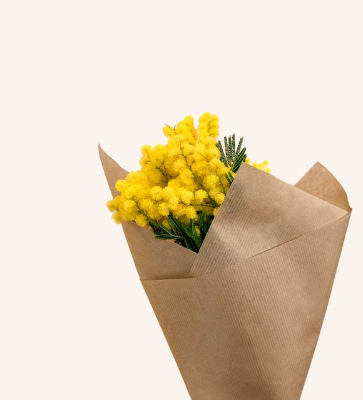
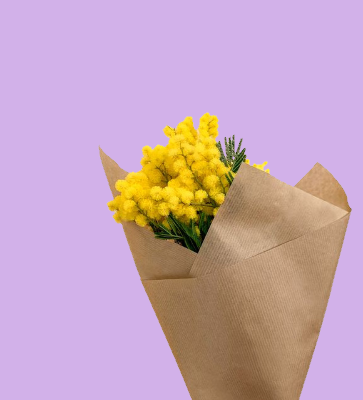
In this example, we give a yellow flower bouquet a new bitmap background. We click the pale background in the input image to pick rgba(251, 244, 238, 255) as the color to replace, set the color sensitivity to 15%, and enter rgb(210, 177, 233) as the replacement color. We also smooth the boundary with a 1-pixel radius, which gently blends the tiny edge pixels into the new lavender background. (Source: Pexels.)
Required options
Bitmap color that should
be replaced. You can also
click a pixel in the input
BMP preview.
New color that should
replace the selected
bitmap color.
Include nearby tones of the
old color. Higher values match
more shadows and highlights.
Preserve each matched pixel's
brightness so texture and
shading remain visible after
recoloring.
Blend pixels along the border
between replaced and unchanged
bitmap areas.
Boundary smoothing radius
in pixels.
Preview the pixels selected
for replacement. Black means
matched and white means
unchanged.
Turn a Red Card Suit Black
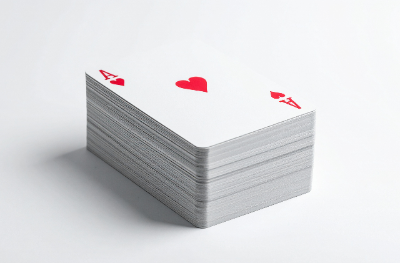
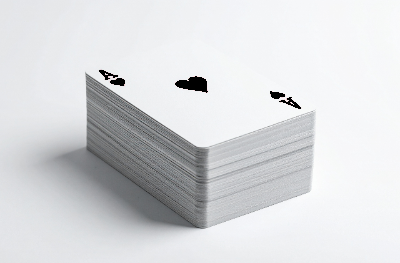
In this example, we recolor the red suit on a bitmap playing card. The input image contains a red ace of hearts, and the tool replaces its bright heart color with black. A 50% sensitivity value also catches the nearby red antialiasing pixels, so the heart symbol and the letter A become black while the white card faces stay unchanged. (Source: Vecteezy.com.)
Required options
Bitmap color that should
be replaced. You can also
click a pixel in the input
BMP preview.
New color that should
replace the selected
bitmap color.
Include nearby tones of the
old color. Higher values match
more shadows and highlights.
Preserve each matched pixel's
brightness so texture and
shading remain visible after
recoloring.
Blend pixels along the border
between replaced and unchanged
bitmap areas.
Boundary smoothing radius
in pixels.
Preview the pixels selected
for replacement. Black means
matched and white means
unchanged.
Make a 3D Smiley Magenta
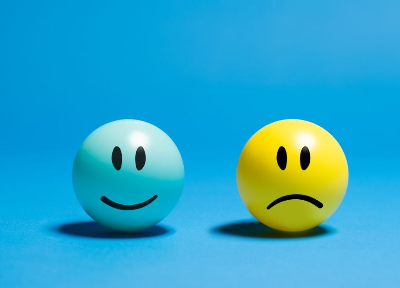
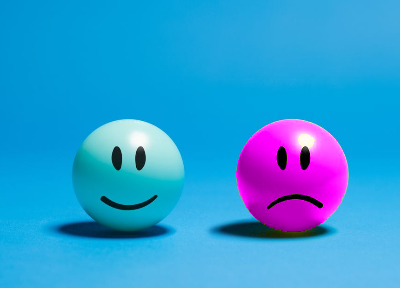
In this example, the bitmap contains two glossy smiley balls, one blue and one yellow. We choose the yellow smiley's base color rgba(164, 173, 18, 255), and change it to magenta with 40% sensitivity. To keep the smiley looking round and three-dimensional, we enable the option that preserves light and dark color details. (Source: Pexels.)
Required options
Bitmap color that should
be replaced. You can also
click a pixel in the input
BMP preview.
New color that should
replace the selected
bitmap color.
Include nearby tones of the
old color. Higher values match
more shadows and highlights.
Preserve each matched pixel's
brightness so texture and
shading remain visible after
recoloring.
Blend pixels along the border
between replaced and unchanged
bitmap areas.
Boundary smoothing radius
in pixels.
Preview the pixels selected
for replacement. Black means
matched and white means
unchanged.
All bitmap tools
Quickly convert an opaque bitmap to a transparent bitmap.
Quickly substitute one color for another in a bitmap.
Quickly find all colors in a bitmap and extract them.
Quickly change the number of bits used by every BMP pixel.
Quickly turn a color bitmap into a grayscale bitmap.
Quickly animate a bitmap sprite sheet.
Quickly convert an animation into a bitmap sprite sheet.
Quickly blur an area of a bitmap.
Quickly sharpen an area of a bitmap.
Quickly pixelate an area of a bitmap.
Quickly create a bitmap file from random, colorful pixels.
Quickly change the width/height of a bitmap.
Quickly select a region from a bitmap.
Quickly rotate a bitmap by any angle.
Quickly flip a bitmap image horizontally.
Quickly flip a bitmap image vertically.
Quickly add a border around or inside a bitmap.
Quickly delete a border that surrounds a bitmap.
Quickly create a byte array from a BMP image.
Quickly create a BMP image from a byte array.
Quickly convert RGB bitmap colors to BGR channel order.
Quickly convert BGR bitmap colors to RGB channel order.
Quickly create a BMP image by mapping text symbols to colored pixels.
Quickly convert a BMP file to the base-64 encoding.
Quickly convert base-64 encoding to a BMP file.
Coming soon
These bitmap tools are on the way
Edit and Draw Bitmaps
Create and edit bitmaps in your browser.
Compress a Bitmap
Make a bitmap smaller in size.
Uncompress a Bitmap
Convert a compressed bitmap to a raw RGB pixel bitmap.
Swirl a Bitmap
Create a swirl of any radius in a bitmap.
Make Bitmap Black and White
Reduce all bitmap colors to just black and white.
Merge Bitmaps
Join two or more bitmaps together.
Overlay Bitmaps
Place two or more bitmaps on top of each other.
Split a Bitmap
Split a bitmap into multiple independent bitmaps.
Extract a Bitmap Fragment
Extract one or more selected areas from a bitmap.
Duplicate a Bitmap
Make copies of bitmaps and paste them together.
Skew a Bitmap
Skew a bitmap by an arbitrary angle.
Shift a Bitmap
Shift a bitmap to the left or right.
Convert Bitmap to Webp
Convert a BMP to a Webp.
Convert Webp to Bitmap
Convert a Webp to a BMP.
Convert Bitmap to PNG
Convert a BMP to a PNG.
Convert PNG to Bitmap
Convert a PNG to a BMP
Convert Bitmap to JPEG
Convert a BMP to a JPG.
Convert JPEG to Bitmap
Convert a JPG to a BMP.
Convert Bitmap to BPG
Convert a BMP to a BPG.
Convert BPG to Bitmap
Convert a BPG to a BMP.
Convert GIF to Bitmap
Save GIF frames as BMP images.
Convert BMP to GIF
Convert a bitmap to a single-frame GIF.
Convert Bitmap to Data URI
Create a Data URL scheme of a bitmap.
Convert Data URI to Bitmap
Convert a Data URL scheme back to a bitmap image.
BitBlt Bitmaps
Bit Blit two or more BMPs.
Replace Bitmap Color Index
Put a new color table in a BMP.
Print Bitmap Color Index
Extract the color table of a BMP.
Print Raw Bitmap Pixels
Extract raw RGB pixels from a BMP and print them out as text.
Convert Raw RGB to BMP
Create a bitmap image from raw RGB pixels.
Randomize Bitmap Color Index
Randomly rearrange colors in the BMP color table.
Optimize a Bitmap
Reduce a BMP's memory footprint.
Destroy a BMP
Destroy parts of a bitmap and make it glitchy.
Subscribe!
Never miss an update
Cool!
Notifications
We'll let you know when we add this tool
Cool!
Feedback
we'd love to hear from you!
Created with love by ![browserling]()

51K
@browserling
We're Browserling — a friendly and fun cross-browser testing company powered by alien technology. At Browserling our mission is to make developers' lives easier, so we created this collection of online bitmap tools. Unlike many other tools, we made our tools free, without ads, and with the simplest possible user interface. Our online bitmap tools are actually powered by our programming tools that we created over the last couple of years. Check them out!
Secret message
If you love our tools, then we love you, too! Use coupon code BMPLING to get a discount at Browserling.
Privacy Policy
we don't log data!
All conversions and calculations are done in your browser using JavaScript. We don't send a single bit about your input data to our servers. There is no server-side processing at all. We use Google Analytics and StatCounter for site usage analytics. Your IP address is saved on our web server, but it's not associated with any personally identifiable information. We don't use cookies and don't store session information in cookies. We use your browser's local storage to save tools' input. It stays on your computer.
Terms of Service
the legal stuff
By using Online Bitmap Tools you agree to our Terms of Service. TLDR: You don't need an account to use our tools. All tools are free of charge and you can use them as much as you want. You can't do illegal or shady things with our tools. We may block your access to tools, if we find out you're doing something bad. We're not liable for your actions and we offer no warranty. We may revise our terms at any time.