
51K
Bitmap Bit Depth Changer
World's simplest bitmap tool
This is a free and fast online utility that changes how many bits a BMP uses to store each pixel. You can use the configuration options (below) to create 32-bit, 24-bit, 16-bit, 8-bit, 4-bit, or 1-bit bitmap files. Extra options allow you to select a grayscale conversion method and a dithering pattern for low-color bitmap formats. Created by graphics designers from team Browserling.
we're on twitter!
tweet tweet
Love what we do? You can follow us on Twitter for updates!
A link to this tool, including input, options and all chained tools.
Click here to select an image from your device, press Ctrl+V to use an image from your clipboard, drag and drop a file from desktop, or load an image from any example below.
Release your mouse to import this file.
Your file is being imported...
Can't convert.
What is a Bitmap Bit Depth Changer?
learn more about this tool
This free online browser-based program changes the bit depth of a BMP image. Bit depth specifies how many bits are used to store each pixel. You can save the bitmap as a 32-bit, 24-bit, 16-bit, 8-bit, 4-bit, or 1-bit BMP. A 24-bit BMP stores eight bits for each blue, green, and red color channel, while a 32-bit BMP adds a fourth unused byte to every pixel. The 16-bit modes pack all three color channels into two bytes. The 5-6-5 mode uses five bits for red, six for green, and five for blue, while the 5-5-5 mode uses five bits for each channel and leaves one bit unused. The 8-bit, 4-bit, and 1-bit formats use indexed colors. Instead of storing a complete RGB value for every pixel, they store the number of a color in the BMP palette. An 8-bit BMP can use up to 256 palette colors, a 4-bit BMP can use up to 16, and a 1-bit BMP uses two. When converting a full-color bitmap image to one of these formats, the tool creates a palette of representative colors and replaces every pixel with the nearest palette color. You can also create grayscale BMPs. In this mode, the tool first converts every pixel to gray using the selected grayscale formula and then creates a palette containing only shades of gray. In the options, you can calculate gray values by averaging the red, green, and blue channels equally or by using weighted formulas that better match how the human eye perceives brightness. You can also apply dithering when creating 4-bit or 1-bit color and grayscale BMPs. Dithering distributes the available palette colors across neighboring pixels in fine patterns, making missing colors, shades, and smooth gradients appear more natural. You can choose Floyd-Steinberg, Atkinson, Stucki, Jarvis, Burkes, Sierra, or another supported dithering pattern. Bmp-abulous!
Bitmap Bit Depth Changer examples
Click to useStore a Bitmap at 32 Bits per Pixel
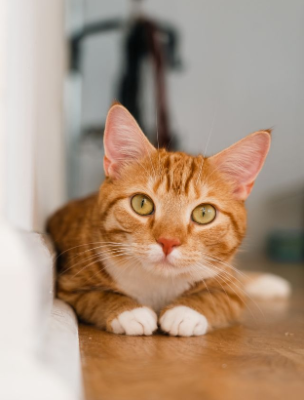
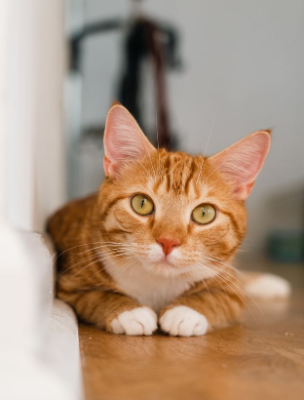
In this example, we convert a regular 24-bit BMP into a 32-bit BMP. It supports the same 16,777,216 RGB colors as a 24-bit BMP because both formats use eight bits for each blue, green, and red channel. The fourth byte is not used for transparency, but it makes every pixel occupy four bytes instead of three, increasing the file size from 365 KB to 486 KB. (Source: Pexels.)
Required options
Choose the output bit depth and
whether indexed pixels use color,
grayscale, or dithering.
Select how RGB becomes gray.
This setting is active only for
grayscale output formats.
Choose the pixel dithering
pattern. This setting is active
only for dithered formats.
Use the Standard 24-bit BMP Layout
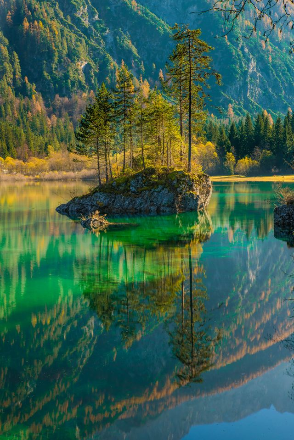
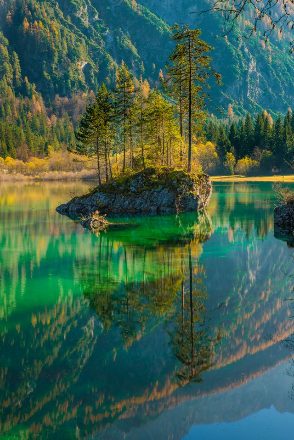
In this example, we save the forest and lake photo as a standard 24-bit BMP. This common bitmap layout stores one byte for blue, one for green, and one for red in every pixel, providing 256 levels per channel and up to 16,777,216 possible colors without using a palette. (Source: Pexels.)
Required options
Choose the output bit depth and
whether indexed pixels use color,
grayscale, or dithering.
Select how RGB becomes gray.
This setting is active only for
grayscale output formats.
Choose the pixel dithering
pattern. This setting is active
only for dithered formats.
Pack a Bitmap into RGB 5-6-5
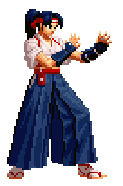
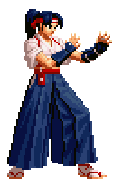
In this example, we convert a bitmap containing a Kasumi Todoh character sprite into a 16-bit RGB 5-6-5 BMP. Each pixel is packed into two bytes using five bits for red, six for green, and five for blue. This arrangement supports up to 65,536 possible colors, with 32 red levels, 64 green levels, and 32 blue levels. The image looks nearly identical to the original, but its file size decreases from 69 KB to 46 KB. (Source: SNK.)
Required options
Choose the output bit depth and
whether indexed pixels use color,
grayscale, or dithering.
Select how RGB becomes gray.
This setting is active only for
grayscale output formats.
Choose the pixel dithering
pattern. This setting is active
only for dithered formats.
Reduce a Parrot to an 8-bit Palette
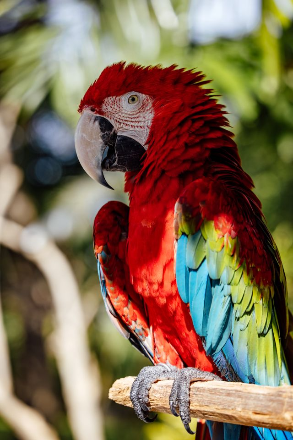
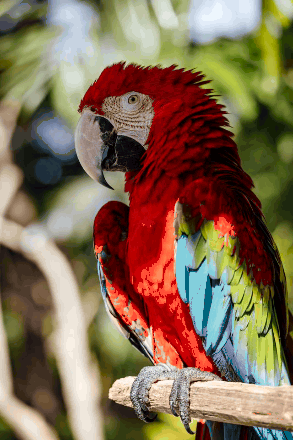
In this example, we convert a full-color bitmap into an 8-bit indexed BMP. The bitmap stores up to 256 colors in a palette, and each pixel contains a one-byte index that points to one of those palette colors. This smaller color range keeps the bird recognizable but simplifies some details. For example, if you look closely at the blue feathers, several areas are filled with a single solid blue color instead of preserving their original texture. (Source: Pexels.)
Required options
Choose the output bit depth and
whether indexed pixels use color,
grayscale, or dithering.
Select how RGB becomes gray.
This setting is active only for
grayscale output formats.
Choose the pixel dithering
pattern. This setting is active
only for dithered formats.
Dither a Frog into a 4-bit BMP
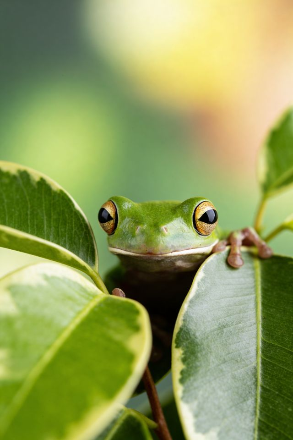
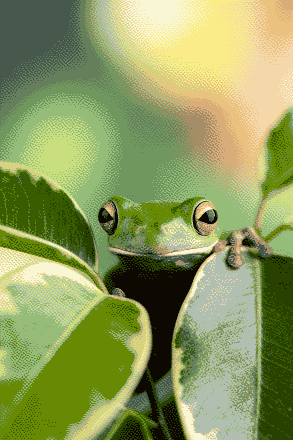
This example reduces a frog bitmap to an indexed 4-bit BMP. It limits the image to a palette of no more than 16 colors, with each pixel storing a 4-bit palette index. To soften the effect of this strong color reduction, Atkinson dithering mixes the available colors in fine pixel patterns. This keeps the frog recognizable and helps retain subtle light and shadow details in the leaf and background. (Source: Pexels.)
Required options
Choose the output bit depth and
whether indexed pixels use color,
grayscale, or dithering.
Select how RGB becomes gray.
This setting is active only for
grayscale output formats.
Choose the pixel dithering
pattern. This setting is active
only for dithered formats.
Draw Elephants in One-bit Black and White
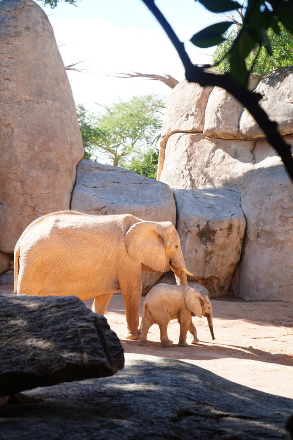
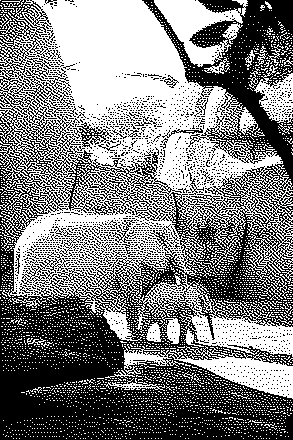
In this example, we reduce a full-color elephant photo to a 1-bit black-and-white BMP. Each pixel uses just one bit, allowing eight pixels to fit into a single byte and reducing the file size from 387 KB to just 18 KB. Sierra dithering arranges black and white pixels into fine patterns that keep the elephants and surrounding zoo details recognizable. (Source: Pexels.)
Required options
Choose the output bit depth and
whether indexed pixels use color,
grayscale, or dithering.
Select how RGB becomes gray.
This setting is active only for
grayscale output formats.
Choose the pixel dithering
pattern. This setting is active
only for dithered formats.
All bitmap tools
Quickly convert an opaque bitmap to a transparent bitmap.
Quickly substitute one color for another in a bitmap.
Quickly find all colors in a bitmap and extract them.
Quickly change the number of bits used by every BMP pixel.
Quickly turn a color bitmap into a grayscale bitmap.
Quickly animate a bitmap sprite sheet.
Quickly convert an animation into a bitmap sprite sheet.
Quickly blur an area of a bitmap.
Quickly sharpen an area of a bitmap.
Quickly pixelate an area of a bitmap.
Quickly create a bitmap file from random, colorful pixels.
Quickly change the width/height of a bitmap.
Quickly select a region from a bitmap.
Quickly rotate a bitmap by any angle.
Quickly add a border around or inside a bitmap.
Quickly delete a border that surrounds a bitmap.
Quickly create a byte array from a BMP image.
Quickly create a BMP image from a byte array.
Quickly convert RGB bitmap colors to BGR channel order.
Quickly convert BGR bitmap colors to RGB channel order.
Quickly create a BMP image by mapping text symbols to colored pixels.
Quickly convert a BMP file to the base-64 encoding.
Quickly convert base-64 encoding to a BMP file.
Coming soon
These bitmap tools are on the way
Edit and Draw Bitmaps
Create and edit bitmaps in your browser.
Compress a Bitmap
Make a bitmap smaller in size.
Uncompress a Bitmap
Convert a compressed bitmap to a raw RGB pixel bitmap.
Swirl a Bitmap
Create a swirl of any radius in a bitmap.
Make Bitmap Black and White
Reduce all bitmap colors to just black and white.
Merge Bitmaps
Join two or more bitmaps together.
Overlay Bitmaps
Place two or more bitmaps on top of each other.
Split a Bitmap
Split a bitmap into multiple independent bitmaps.
Extract a Bitmap Fragment
Extract one or more selected areas from a bitmap.
Duplicate a Bitmap
Make copies of bitmaps and paste them together.
Skew a Bitmap
Skew a bitmap by an arbitrary angle.
Shift a Bitmap
Shift a bitmap to the left or right.
Flip a Bitmap Vertically
Turn a bitmap upside-down.
Flip a Bitmap Horizontally
Make a mirror copy of a bitmap.
Convert Bitmap to Webp
Convert a BMP to a Webp.
Convert Webp to Bitmap
Convert a Webp to a BMP.
Convert Bitmap to PNG
Convert a BMP to a PNG.
Convert PNG to Bitmap
Convert a PNG to a BMP
Convert Bitmap to JPEG
Convert a BMP to a JPG.
Convert JPEG to Bitmap
Convert a JPG to a BMP.
Convert Bitmap to BPG
Convert a BMP to a BPG.
Convert BPG to Bitmap
Convert a BPG to a BMP.
Convert GIF to Bitmap
Save GIF frames as BMP images.
Convert BMP to GIF
Convert a bitmap to a single-frame GIF.
Convert Bitmap to Data URI
Create a Data URL scheme of a bitmap.
Convert Data URI to Bitmap
Convert a Data URL scheme back to a bitmap image.
BitBlt Bitmaps
Bit Blit two or more BMPs.
Replace Bitmap Color Index
Put a new color table in a BMP.
Print Bitmap Color Index
Extract the color table of a BMP.
Print Raw Bitmap Pixels
Extract raw RGB pixels from a BMP and print them out as text.
Convert Raw RGB to BMP
Create a bitmap image from raw RGB pixels.
Randomize Bitmap Color Index
Randomly rearrange colors in the BMP color table.
Optimize a Bitmap
Reduce a BMP's memory footprint.
Destroy a BMP
Destroy parts of a bitmap and make it glitchy.
Subscribe!
Never miss an update
Cool!
Notifications
We'll let you know when we add this tool
Cool!
Feedback
we'd love to hear from you!
Created with love by ![browserling]()

51K
@browserling
We're Browserling — a friendly and fun cross-browser testing company powered by alien technology. At Browserling our mission is to make developers' lives easier, so we created this collection of online bitmap tools. Unlike many other tools, we made our tools free, without ads, and with the simplest possible user interface. Our online bitmap tools are actually powered by our programming tools that we created over the last couple of years. Check them out!
Secret message
If you love our tools, then we love you, too! Use coupon code BMPLING to get a discount at Browserling.
Privacy Policy
we don't log data!
All conversions and calculations are done in your browser using JavaScript. We don't send a single bit about your input data to our servers. There is no server-side processing at all. We use Google Analytics and StatCounter for site usage analytics. Your IP address is saved on our web server, but it's not associated with any personally identifiable information. We don't use cookies and don't store session information in cookies. We use your browser's local storage to save tools' input. It stays on your computer.
Terms of Service
the legal stuff
By using Online Bitmap Tools you agree to our Terms of Service. TLDR: You don't need an account to use our tools. All tools are free of charge and you can use them as much as you want. You can't do illegal or shady things with our tools. We may block your access to tools, if we find out you're doing something bad. We're not liable for your actions and we offer no warranty. We may revise our terms at any time.