
51K
Animation to Bitmap Sprite Converter
World's simplest bitmap tool
This is a free and fast online utility that turns the frames of a GIF animation into one BMP sprite sheet. You can use the configuration options (below) to preview the GIF animation, choose the frame order, omit unneeded moments, and arrange the remaining sprites into rows and columns. Extra options allow you to place padding around the sheet, resize every sprite, and select the bitmap canvas color. Created by graphics designers from team Browserling.
announcement
new tools!
We just launched a new tools category – Online WebP Tools – utilities for working with WebP images. Check it out!
A link to this tool, including input, options and all chained tools.
Click here to select an image from your device, press Ctrl+V to use an image from your clipboard, drag and drop a file from desktop, or load an image from any example below.
Release your mouse to import this file.
Your file is being imported...
Can't convert.
What is a Animation to Bitmap Sprite Converter?
learn more about this tool
This free online browser-based program converts a GIF animation into a BMP image that holds its frames as neatly arranged bitmap sprites. Instead of saving each moment as a separate file, the program opens the animation, collects its frames, and draws them together on one static sprite sheet. This layout is convenient when you need a compact frame atlas for a game, want to compare motion poses at a glance, or plan to edit several animation stages in a bitmap editor. The input preview plays the source animation while the output shows the complete BMP sheet, so you can inspect both the motion and the frame arrangement at the same time. Use the preview frame time option to slow down a quick animation or speed up a long one. The value is measured in milliseconds; for example, 250 milliseconds corresponds to 4 fps. You can also activate the backward preview option to play the animation from the last frame to the first and arrange the exported sprites in reverse order. To control the shape of the sheet, enter its row count, its column count, or both. Setting one row produces a left-to-right bitmap strip, while setting one column produces a top-to-bottom strip. When both dimensions are present, they must provide enough cells for the selected sprites. To exclude unwanted frames from the final BMP, list their positions in the skip field. You can enter individual frames such as "2, 6, 9", ranges such as "4-8", or combinations such as "1, 3-5, 11". The padding setting adds an even border around the entire sprite sheet. Use the zoom setting to scale all extracted frames before they are combined into the BMP sprite sheet. A value of 100% preserves the animation's original frame dimensions, 50% makes each sprite half-sized, and 200% doubles its width and height. You can also choose a bitmap canvas color for the area behind transparent frames and for the padding around the sheet. For the reverse operation, use the Animate Bitmap Sprites tool to convert a BMP sprite sheet into an animation. Bmp-abulous!
Animation to Bitmap Sprite Converter examples
Click to useBuild a Hopper Mecha BMP Strip
In this example, we convert a ten-frame Hopper Mecha animation from Metal Slug 3 into a tall bitmap sprite strip. We set the layout to one column, so the mechanical creature's changing poses are stacked from top to bottom in their original order. We convert the frames to BMP at their original size and add a light lavender background to the finished strip. (Source: SNK.)


Required options
Show the input animation in
motion.
Time each frame stays visible.
(1000 milliseconds = 1 second.)
Run from the final frame to
the first frame.
Number of rows.
Number of columns.
Leave these frame positions out.
(Examples: "2, 5", "4-8", "1, 6-9".)
Add this many pixels around
the bitmap sprite sheet.
Resize every animation frame.
(100% keeps the original size.)
Set the background color of
the bitmap sprite sheet.
Extract Ryu's Shoryuken to a BMP Strip
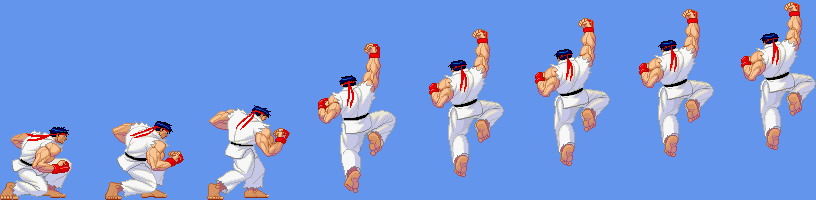
In this example, we isolate the rising part of Ryu's Shoryuken from Street Fighter Alpha 3 and turn it into a horizontal bitmap sprite strip. We slow the preview to 250 milliseconds per frame, making each step of the move easier to inspect and the needed section easier to select. The source animation has seventeen frames, but we skip frames 9 through 17 and keep the first eight poses, from the low starting stance to the airborne uppercut. (Source: Capcom.)

Required options
Show the input animation in
motion.
Time each frame stays visible.
(1000 milliseconds = 1 second.)
Run from the final frame to
the first frame.
Number of rows.
Number of columns.
Leave these frame positions out.
(Examples: "2, 5", "4-8", "1, 6-9".)
Add this many pixels around
the bitmap sprite sheet.
Resize every animation frame.
(100% keeps the original size.)
Set the background color of
the bitmap sprite sheet.
Arrange an Elephant Walk in a Bitmap Grid
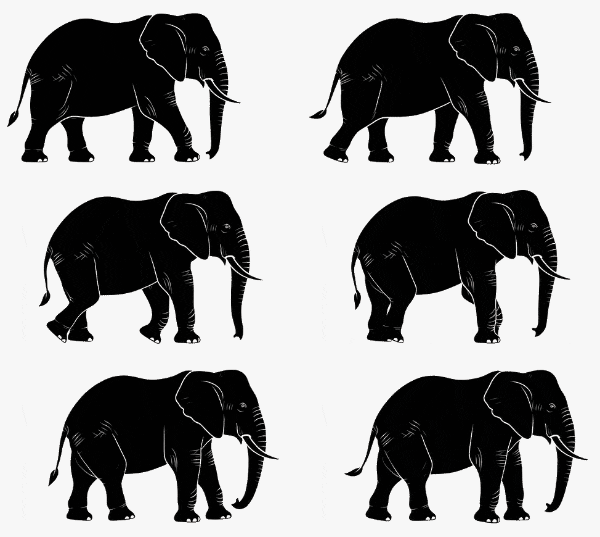
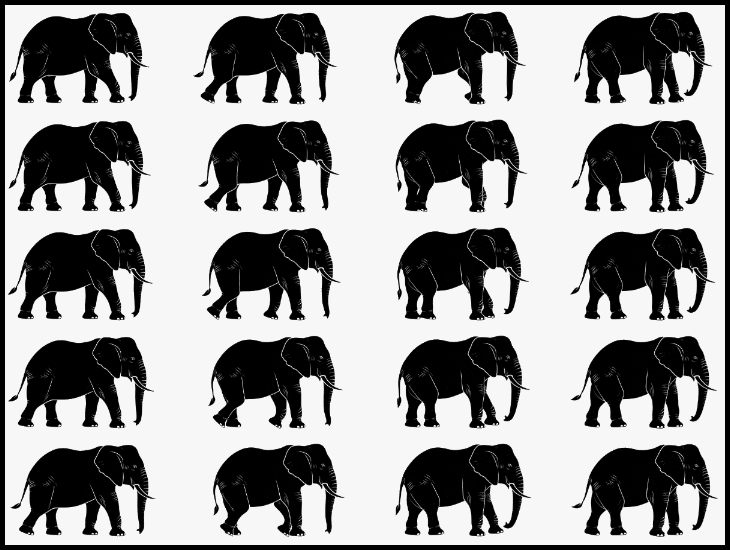
In this example, we extract all twenty frames from an elephant walking animation and arrange them as a five-row by four-column bitmap grid. We reduce every 300-by-179-pixel frame to 60% of its original size and add five pixels of padding, which creates a narrow black border around the completed BMP sprite sheet. (Source: Vecteezy.com.)
Required options
Show the input animation in
motion.
Time each frame stays visible.
(1000 milliseconds = 1 second.)
Run from the final frame to
the first frame.
Number of rows.
Number of columns.
Leave these frame positions out.
(Examples: "2, 5", "4-8", "1, 6-9".)
Add this many pixels around
the bitmap sprite sheet.
Resize every animation frame.
(100% keeps the original size.)
Set the background color of
the bitmap sprite sheet.
All bitmap tools
Quickly convert an opaque bitmap to a transparent bitmap.
Quickly substitute one color for another in a bitmap.
Quickly find all colors in a bitmap and extract them.
Quickly change the number of bits used by every BMP pixel.
Quickly turn a color bitmap into a grayscale bitmap.
Quickly animate a bitmap sprite sheet.
Quickly convert an animation into a bitmap sprite sheet.
Quickly blur an area of a bitmap.
Quickly sharpen an area of a bitmap.
Quickly pixelate an area of a bitmap.
Quickly create a bitmap file from random, colorful pixels.
Quickly change the width/height of a bitmap.
Quickly select a region from a bitmap.
Quickly rotate a bitmap by any angle.
Quickly add a border around or inside a bitmap.
Quickly delete a border that surrounds a bitmap.
Quickly create a byte array from a BMP image.
Quickly create a BMP image from a byte array.
Quickly convert RGB bitmap colors to BGR channel order.
Quickly convert BGR bitmap colors to RGB channel order.
Quickly create a BMP image by mapping text symbols to colored pixels.
Quickly convert a BMP file to the base-64 encoding.
Quickly convert base-64 encoding to a BMP file.
Coming soon
These bitmap tools are on the way
Edit and Draw Bitmaps
Create and edit bitmaps in your browser.
Compress a Bitmap
Make a bitmap smaller in size.
Uncompress a Bitmap
Convert a compressed bitmap to a raw RGB pixel bitmap.
Swirl a Bitmap
Create a swirl of any radius in a bitmap.
Make Bitmap Black and White
Reduce all bitmap colors to just black and white.
Merge Bitmaps
Join two or more bitmaps together.
Overlay Bitmaps
Place two or more bitmaps on top of each other.
Split a Bitmap
Split a bitmap into multiple independent bitmaps.
Extract a Bitmap Fragment
Extract one or more selected areas from a bitmap.
Duplicate a Bitmap
Make copies of bitmaps and paste them together.
Skew a Bitmap
Skew a bitmap by an arbitrary angle.
Shift a Bitmap
Shift a bitmap to the left or right.
Flip a Bitmap Vertically
Turn a bitmap upside-down.
Flip a Bitmap Horizontally
Make a mirror copy of a bitmap.
Convert Bitmap to Webp
Convert a BMP to a Webp.
Convert Webp to Bitmap
Convert a Webp to a BMP.
Convert Bitmap to PNG
Convert a BMP to a PNG.
Convert PNG to Bitmap
Convert a PNG to a BMP
Convert Bitmap to JPEG
Convert a BMP to a JPG.
Convert JPEG to Bitmap
Convert a JPG to a BMP.
Convert Bitmap to BPG
Convert a BMP to a BPG.
Convert BPG to Bitmap
Convert a BPG to a BMP.
Convert GIF to Bitmap
Save GIF frames as BMP images.
Convert BMP to GIF
Convert a bitmap to a single-frame GIF.
Convert Bitmap to Data URI
Create a Data URL scheme of a bitmap.
Convert Data URI to Bitmap
Convert a Data URL scheme back to a bitmap image.
BitBlt Bitmaps
Bit Blit two or more BMPs.
Replace Bitmap Color Index
Put a new color table in a BMP.
Print Bitmap Color Index
Extract the color table of a BMP.
Print Raw Bitmap Pixels
Extract raw RGB pixels from a BMP and print them out as text.
Convert Raw RGB to BMP
Create a bitmap image from raw RGB pixels.
Randomize Bitmap Color Index
Randomly rearrange colors in the BMP color table.
Optimize a Bitmap
Reduce a BMP's memory footprint.
Destroy a BMP
Destroy parts of a bitmap and make it glitchy.
Subscribe!
Never miss an update
Cool!
Notifications
We'll let you know when we add this tool
Cool!
Feedback
we'd love to hear from you!
Created with love by ![browserling]()

51K
@browserling
We're Browserling — a friendly and fun cross-browser testing company powered by alien technology. At Browserling our mission is to make developers' lives easier, so we created this collection of online bitmap tools. Unlike many other tools, we made our tools free, without ads, and with the simplest possible user interface. Our online bitmap tools are actually powered by our programming tools that we created over the last couple of years. Check them out!
Secret message
If you love our tools, then we love you, too! Use coupon code BMPLING to get a discount at Browserling.
Privacy Policy
we don't log data!
All conversions and calculations are done in your browser using JavaScript. We don't send a single bit about your input data to our servers. There is no server-side processing at all. We use Google Analytics and StatCounter for site usage analytics. Your IP address is saved on our web server, but it's not associated with any personally identifiable information. We don't use cookies and don't store session information in cookies. We use your browser's local storage to save tools' input. It stays on your computer.
Terms of Service
the legal stuff
By using Online Bitmap Tools you agree to our Terms of Service. TLDR: You don't need an account to use our tools. All tools are free of charge and you can use them as much as you want. You can't do illegal or shady things with our tools. We may block your access to tools, if we find out you're doing something bad. We're not liable for your actions and we offer no warranty. We may revise our terms at any time.