
51K
Bitmap to Byte Array Converter
World's simplest bitmap tool
This is a free and fast online utility that converts the color channels of every BMP pixel into a byte array. You can use the configuration options (below) to print the channels as decimal RGB bytes or two-digit hexadecimal bytes and arrange them in any RGB channel order. Extra options allow you to add a 0x prefix, change the hex letter case, choose the array dimensions and brackets, customize byte and pixel separators, and preserve the bitmap's row width. Created by graphics designers from team Browserling.
We put a browser in your browser!
Browserling
Check out our project Browserling – get a browser in your browser.
A link to this tool, including input, options and all chained tools.
Click here to select an image from your device, press Ctrl+V to use an image from your clipboard, drag and drop a file from desktop, or load an image from any example below.
Release your mouse to import this file.
Your file is being imported...
Can't convert.
What is a Bitmap to Byte Array Converter?
learn more about this tool
This free online browser-based program converts a BMP image into a byte array representing its pixel colors. A byte array is an ordered sequence of 8-bit values. Each byte can be written as a decimal number from 0 to 255 or as a hexadecimal value from 00 to ff. In this conversion, every pixel contributes three such bytes: one for red, one for green, and one for blue. The tool reads the bitmap row by row, starting at the upper-left pixel and continuing to the lower-right pixel, and writes the three-channel values of each pixel in sequence. The "Print RGB Bytes" mode writes channel values as decimal numbers. For example, a white pixel becomes "255, 255, 255", a black pixel becomes "0, 0, 0", and a bright red pixel becomes "255, 0, 0". The "Print Hex Bytes" mode writes the same channel values in base 16. Each byte uses exactly two hex digits, from 00 to ff, so the same white, black, and red pixels become "ff, ff, ff", "00, 00, 00", and "ff, 00, 00". Although colors are commonly described in RGB order, standard 24-bit BMP files usually store the three-channel bytes in BGR order. You can select BGR in the byte-order options to reproduce this channel order, use RGB for a more conventional color representation, or choose one of the other supported orders: RBG, GRB, GBR, or BRG. Hexadecimal output can also be customized by adding the "0x" prefix and using uppercase letters A through F. You can output the bytes as a plain list such as "r, g, b, r, g, b", a one-dimensional array such as "[r, g, b, r, g, b]", a pixel-grouped array such as "[[r, g, b], [r, g, b]]", a row-grouped array such as "[[r, g, b, r, g, b], ...]", or a fully nested array such as "[[[r, g, b], [r, g, b]], ...]". The bracket type and the separators between channel values and complete pixels can be adjusted independently. You can also insert a line break between consecutive bitmap rows so that the text layout follows the width and row structure of the original bitmap. To perform the reverse conversion and build a BMP image from pixel byte values, use our Convert Byte Array to Bitmap tool. Bmp-abulous!
Bitmap to Byte Array Converter examples
Click to useSonic Sprite as an RGB Byte Array
In this example, we convert a 124×164 pixel-art BMP of Sonic the Hedgehog into decimal pixel bytes. We keep the channels in RGB order and place all their values into a single, one-dimensional array enclosed in square brackets. Both the channel and pixel separators are a comma followed by a space. (Source: Sega.)

[255, 255, 255, 255, 255, 255, 255, 255, 255, 255, 255, 255, 255, 255, 255, 255, 255, 255, 255, 255, 255, 255, 255, 255, 255, 255, 255, 255, 255, 255, 255, 255, 255, 255, 255, 255, 255, 255, 255, 255, 255, 255, 255, 255, 255, 255, 255, 255, 255, 255, 255, 255, 255, 255, 255, 255, 255, 255, 255, 255, 255, 255, 255, 255, 255, 255, 255, 255, 255, 255, 255, 255, 255, 255, 255, 255, 255, 255, 255, 255, 255, 255, 255, 255, 255, 255, 255, 255, 255, 255, 255, 255, 255, 255, 255, 255, 255, 255, 255, 255, 255, 255, 255, 255, 255, 255, 255, 255, 255, 255, 255, 255, 255, 255, 255, 255, 255, 255, 255, 255, 255, 255, 255, 255, 255, 255, 255, 255, 255, 255, 255, 255, 255, 255, 255, ...
Required options
Choose the order of the red,
green, and blue bytes in every
output pixel.
Choose how pixels and bitmap
rows are grouped into arrays.
Select the bracket pair used.
Write each pixel channel as a
decimal byte from 0 to 255.
Write each pixel channel as a
two-digit hex value from 00 to ff.
Place "0x" before every
hexadecimal channel byte.
Use uppercase A through F in
hexadecimal channel values.
Set the delimiter between the
three bytes inside each pixel.
Set the delimiter between one
complete pixel and the next.
Insert a line break after
each complete bitmap row.
Orange Kitten in BGR Hex Bytes
In this example, we convert a BMP photo of an orange kitten to lowercase hex bytes in BGR order. Standard 24-bit BMP files commonly store blue before green and red, so this order follows the usual BMP channel layout. Each pixel is grouped in square brackets, with commas between channels and semicolons between pixels. (Source: Pexels.)
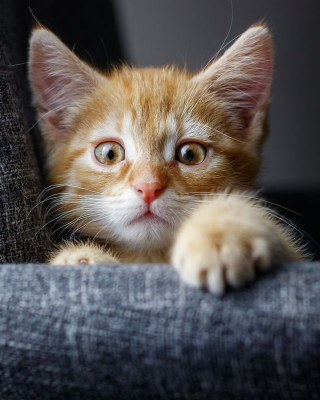
[[[18, 13, 14]; [15, 10, 11]; [15, 10, 11]; [19, 14, 15]; [19, 14, 15]; [18, 13, 14]; [17, 12, 13]; [16, 11, 12]; [14, 12, 11]; [13, 11, 10]; [11, 0f, 0e]; [10, 0e, 0d]; [0e, 0c, 0b]; [0d, 0b, 0a]; [0b, 09, 08]; [0b, 09, 08]; [0c, 0a, 0a]; [0c, 0a, 0a]; [0c, 0a, 0a]; [0c, 0a, 0a]; [0b, 09, 09]; [0a, 08, 08]; [0a, 08, 08]; [09, 07, 07]; [09, 07, 07]; [09, 07, 07]; [09, 07, 07]; [09, 07, 07]; [09, 07, 07]; [0a, 08, 08]; [0a, 08, 08]; [0b, 09, 09]; [0b, 09, 09]; [0b, 09, 09]; [0c, 0a, 0a]; [0c, 0a, 0a]; [0c, 0a, 0a]; [0d, 0b, 0b]; [0d, 0b, 0b]; [0e, 0c, 0c]; [0c, 0a, 0a]; [0c, 0a, 0a]; [0c, 0a, 0a]; [0c, 0a, 0a]; [0d, 0b, 0b]; [0d, 0b, 0b]; [0d, 0b, 0b]; [0d, 0b, 0b]; [0d, 0b, 0b]; ...
Required options
Choose the order of the red,
green, and blue bytes in every
output pixel.
Choose how pixels and bitmap
rows are grouped into arrays.
Select the bracket pair used.
Write each pixel channel as a
decimal byte from 0 to 255.
Write each pixel channel as a
two-digit hex value from 00 to ff.
Place "0x" before every
hexadecimal channel byte.
Use uppercase A through F in
hexadecimal channel values.
Set the delimiter between the
three bytes inside each pixel.
Set the delimiter between one
complete pixel and the next.
Insert a line break after
each complete bitmap row.
BGR Hex Rows of a Tropical Lagoon
In this example, we convert an aerial BMP photo of a lagoon into uppercase hex bytes in BGR order – blue, green, and red. Each byte has a 0x prefix, which is commonly used in programming to identify hexadecimal values. We separate the three bytes of each pixel with dashes, separate neighboring pixels with spaces, and place each bitmap row in round brackets on a separate line. (Source: Pexels.)
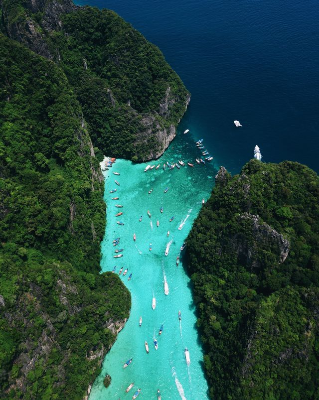
((0x25-0x1C-0x15 0x2E-0x2A-0x22 0x21-0x27-0x1C 0x22-0x2E-0x1F 0x3A-0x4B-0x39 0x40-0x51-0x3C 0x24-0x31-0x1B 0x2E-0x39-0x23 0x27-0x34-0x22 0x1A-0x25-0x13 0x25-0x2B-0x1A 0x2A-0x2B-0x1B 0x2B-0x2B-0x1B 0x27-0x28-0x18 0x31-0x34-0x24 0x1F-0x25-0x14 0x2B-0x2B-0x1F 0x2D-0x2F-0x20 0x1C-0x22-0x11 0x15-0x1E-0x0A 0x19-0x22-0x0E 0x12-0x1A-0x09 0x22-0x27-0x18 0x2D-0x31-0x25 0x17-0x21-0x11 0x33-0x3C-0x2C 0x1E-0x21-0x15 0x26-0x26-0x1A 0x20-0x1C-0x11 0x26-0x1D-0x14 0x26-0x1B-0x13 0x57-0x4B-0x46 0x64-0x60-0x64 0x59-0x54-0x56 0x58-0x52-0x53 0x38-0x31-0x2F 0x33-0x2B-0x25 0x36-0x2D-0x24 0x2F-0x25-0x1B 0x26-0x1E-0x11 0x2C-0x28-0x1A 0x33-0x2D-0x20 ...
Required options
Choose the order of the red,
green, and blue bytes in every
output pixel.
Choose how pixels and bitmap
rows are grouped into arrays.
Select the bracket pair used.
Write each pixel channel as a
decimal byte from 0 to 255.
Write each pixel channel as a
two-digit hex value from 00 to ff.
Place "0x" before every
hexadecimal channel byte.
Use uppercase A through F in
hexadecimal channel values.
Set the delimiter between the
three bytes inside each pixel.
Set the delimiter between one
complete pixel and the next.
Insert a line break after
each complete bitmap row.
All bitmap tools
Quickly convert an opaque bitmap to a transparent bitmap.
Quickly substitute one color for another in a bitmap.
Quickly find all colors in a bitmap and extract them.
Quickly change the number of bits used by every BMP pixel.
Quickly turn a color bitmap into a grayscale bitmap.
Quickly animate a bitmap sprite sheet.
Quickly convert an animation into a bitmap sprite sheet.
Quickly blur an area of a bitmap.
Quickly sharpen an area of a bitmap.
Quickly pixelate an area of a bitmap.
Quickly create a bitmap file from random, colorful pixels.
Quickly change the width/height of a bitmap.
Quickly select a region from a bitmap.
Quickly rotate a bitmap by any angle.
Quickly flip a bitmap image horizontally.
Quickly flip a bitmap image vertically.
Quickly add a border around or inside a bitmap.
Quickly delete a border that surrounds a bitmap.
Quickly create a byte array from a BMP image.
Quickly create a BMP image from a byte array.
Quickly convert RGB bitmap colors to BGR channel order.
Quickly convert BGR bitmap colors to RGB channel order.
Quickly create a BMP image by mapping text symbols to colored pixels.
Quickly convert a BMP file to the base-64 encoding.
Quickly convert base-64 encoding to a BMP file.
Coming soon
These bitmap tools are on the way
Edit and Draw Bitmaps
Create and edit bitmaps in your browser.
Compress a Bitmap
Make a bitmap smaller in size.
Uncompress a Bitmap
Convert a compressed bitmap to a raw RGB pixel bitmap.
Swirl a Bitmap
Create a swirl of any radius in a bitmap.
Make Bitmap Black and White
Reduce all bitmap colors to just black and white.
Merge Bitmaps
Join two or more bitmaps together.
Overlay Bitmaps
Place two or more bitmaps on top of each other.
Split a Bitmap
Split a bitmap into multiple independent bitmaps.
Extract a Bitmap Fragment
Extract one or more selected areas from a bitmap.
Duplicate a Bitmap
Make copies of bitmaps and paste them together.
Skew a Bitmap
Skew a bitmap by an arbitrary angle.
Shift a Bitmap
Shift a bitmap to the left or right.
Convert Bitmap to Webp
Convert a BMP to a Webp.
Convert Webp to Bitmap
Convert a Webp to a BMP.
Convert Bitmap to PNG
Convert a BMP to a PNG.
Convert PNG to Bitmap
Convert a PNG to a BMP
Convert Bitmap to JPEG
Convert a BMP to a JPG.
Convert JPEG to Bitmap
Convert a JPG to a BMP.
Convert Bitmap to BPG
Convert a BMP to a BPG.
Convert BPG to Bitmap
Convert a BPG to a BMP.
Convert GIF to Bitmap
Save GIF frames as BMP images.
Convert BMP to GIF
Convert a bitmap to a single-frame GIF.
Convert Bitmap to Data URI
Create a Data URL scheme of a bitmap.
Convert Data URI to Bitmap
Convert a Data URL scheme back to a bitmap image.
BitBlt Bitmaps
Bit Blit two or more BMPs.
Replace Bitmap Color Index
Put a new color table in a BMP.
Print Bitmap Color Index
Extract the color table of a BMP.
Print Raw Bitmap Pixels
Extract raw RGB pixels from a BMP and print them out as text.
Convert Raw RGB to BMP
Create a bitmap image from raw RGB pixels.
Randomize Bitmap Color Index
Randomly rearrange colors in the BMP color table.
Optimize a Bitmap
Reduce a BMP's memory footprint.
Destroy a BMP
Destroy parts of a bitmap and make it glitchy.
Subscribe!
Never miss an update
Cool!
Notifications
We'll let you know when we add this tool
Cool!
Feedback
we'd love to hear from you!
Created with love by ![browserling]()

51K
@browserling
We're Browserling — a friendly and fun cross-browser testing company powered by alien technology. At Browserling our mission is to make developers' lives easier, so we created this collection of online bitmap tools. Unlike many other tools, we made our tools free, without ads, and with the simplest possible user interface. Our online bitmap tools are actually powered by our programming tools that we created over the last couple of years. Check them out!
Secret message
If you love our tools, then we love you, too! Use coupon code BMPLING to get a discount at Browserling.
Privacy Policy
we don't log data!
All conversions and calculations are done in your browser using JavaScript. We don't send a single bit about your input data to our servers. There is no server-side processing at all. We use Google Analytics and StatCounter for site usage analytics. Your IP address is saved on our web server, but it's not associated with any personally identifiable information. We don't use cookies and don't store session information in cookies. We use your browser's local storage to save tools' input. It stays on your computer.
Terms of Service
the legal stuff
By using Online Bitmap Tools you agree to our Terms of Service. TLDR: You don't need an account to use our tools. All tools are free of charge and you can use them as much as you want. You can't do illegal or shady things with our tools. We may block your access to tools, if we find out you're doing something bad. We're not liable for your actions and we offer no warranty. We may revise our terms at any time.